7 tedious content tasks you can hand over to AI
1 promo, 6 sizes, by hand, every time. That was my Tuesday at The Luxe Nomad, where I ran the whole content calendar on my own: writing the posts, scheduling them, auditing the listings, resizing everything in Canva.
If you run your own brand, you know that week. You make one good post, then five rushed ones, because resizing and captioning eat the hours you set aside to make the content.
I hand 7 of those tasks over to AI now. Here's each one and the prompts you can copy/paste.
1. Write social captions with an AI caption generator
It's tempting to write a quick and easy caption like “check out our new…”. But that caption could be for any pasta brand or any payroll app, so no one stops scrolling for it.
Captions carry more of the post than people assume. Socialinsider analyzed 9.1 million Instagram posts from 82,952 business pages and found captions under 30 words pull a higher engagement rate than longer ones, and that engagement drops as captions get longer. So the caption has roughly 30 words to work, and the words you pick decide whether the post performs. Good captions do three jobs in those 30 words: a hook that earns the first line, a voice that sounds like you and nobody else, and a CTA that asks for one thing.
Pass that to AI and have it work it out for you. Ask for three versions rather than one, each on a different angle: curiosity, benefit, and specificity. If you just ask for one caption, you have nothing to judge it against, since it's the only option you've seen. Meanwhile, three angles let you choose the best one.

Note that AI usually gets your brand voice wrong, because it doesn't know you yet. Tell it once rather than per caption: paste your website copy and two posts that sound right, then ask it to write down your tone, your words, and how you close a post. Keep that and feed it in every time.
Pro tip: SecretSauce does the brand step for you. It reads your site and your existing posts and creates a Brand Brain, then writes every caption from it. So you skip the copy/paste and constantly reminding the AI to write like your brand. More on training AI on your brand voice.
2. Resize one image for every platform with an AI image resizer
You finish a killer hero image, but now you need to resize it into 1:1 for the feed, a 9:16 for Stories and Reels, a 16:9 one for YouTube, plus whatever ratios your ads require. So you either quick-crop and cut out half the image, or you rebuild each one properly in Figma and lose the afternoon.
If you don't resize at all, you miss the audience on Stories, Reels, and YouTube entirely. So you want to get this right.

Hand the resizing to AI, but make sure to check which of the two methods it uses:
Expand
Expand keeps your original and generates new background around it to fill the bigger frame. Firefly's Generative Expand and Getimg's Outpainting work this way. Good when you need more room around your subject. The catch is that your elements don't move, so a logo already near the edge still sits near the edge, and anything outside the new frame stays outside it.
Rebuild
Rebuild regenerates the composition for the new ratio and moves the elements. Better for ads and anything carrying text, with the risk that a model redrawing your image also redraws your logo.
Pro tip: Smart Resizer in SecretSauce does both and picks the best method so you don't have to work it out yourself. Drop in one image, pick your sizes or platforms (Facebook and Meta, Google, Reddit) and get your resized images back. Our Smart Resizer docs list every size available.
3. Write ad copy variations with AI
Good performance marketing means testing, and testing means writing multiple versions of the same headline, body copy, and CTAs.
Pass the work to AI, but name the angles yourself rather than asking for variations: price, speed, the problem you remove, the status of owning your product. Tell it the objective too. Copy written for conversions is different from copy written for reach, and AI picks a middle register when you don't say which you want.
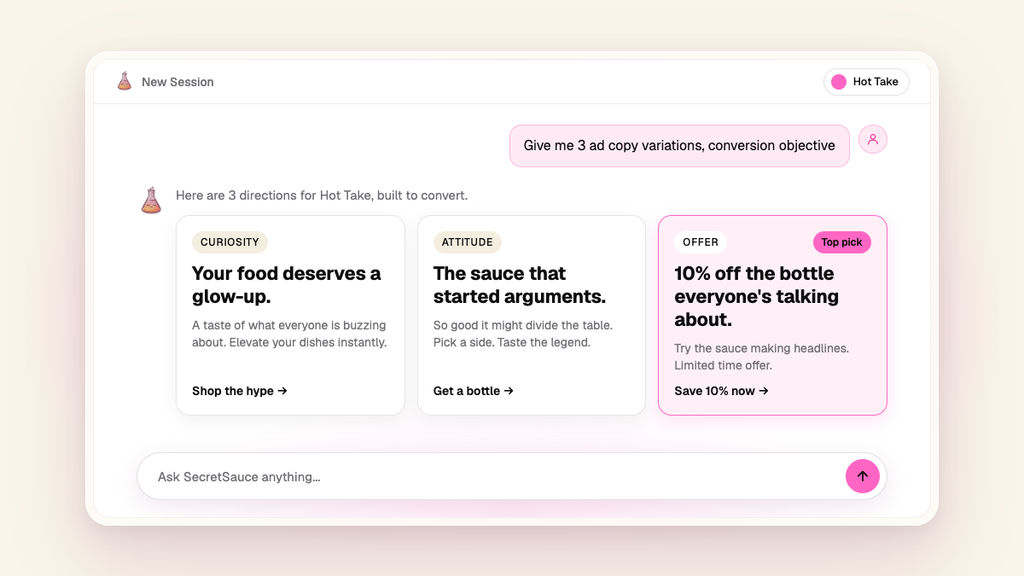
Pro tip: Ask SecretSauce for 5 Meta ad copy variations. You get 5 sets, each one a headline, body, and CTA on a different angle, written in your brand voice.
4. Produce AI product photos from one reference shot
You need fresh photos for every product launch, every seasonal push, every sale banner, but hiring photographers three times over sits outside most budgets. So you reuse the same three shots from launch week until your feed starts looking stale.

AI handles product photos well now, on one condition: it needs a clean reference. Shoot your product on a plain background in daylight, label straight and in focus. That photo decides everything after it, since AI can build a scene around your product but can't invent the parts your photo didn't show.
Ask for one scene at a time rather than a batch of 10, and fix what's wrong before you generate the next. A batch of 10 gets you 10 versions of the same mistake. Then check the label on every image. AI garbles the text on your packaging more than anything else, so zoom in on your logo before you post.
Pro tip: Upload one product photo to SecretSauce and get a full set of photos back: hero shots and lifestyle scenes, or every angle you need for a product page. SecretSauce asks what you're using them for, suggests a few shot ideas, and generates the ones you pick. Borderlessbutter saved 6 hours a week on product photos this way. The product photography docs walk through the whole flow.
5. Make short form videos with an AI video generator
You postpone posting videos because producing them by hand is a project: shoot day, editing, exporting, repeated every week. But postponing costs you the best-performing format you have. Metricool's study of 24.3 million Instagram posts found Reels generate more than 4x the interactions of single-image posts, and Sprout Social's 2026 Content Strategy Report has 52% of Instagram users and 48% of Facebook users naming short-form video as the brand content they're most likely to interact with.
AI video is getting better and better all the time. Give AI a format with a reason to exist. “A video about my product” gets you something generic, where “someone opening the box and reacting to the packaging” gets you a video with a point.

Pro tip: SecretSauce does the thinking for you. Pick a product you've saved, choose a style from a dropdown menu (testimonial, unboxing, review or product demo) then pick your opening line from 8 options. Your Brand Brain handles the rest: it writes the script in your brand's voice, casts someone who looks like your customer, and sets the scene in your brand's colours. So the video comes out sounding like you rather than like a stock ad. The UGC video docs list every style.
6. Build carousels and multi slide posts with AI
Carousels take longer to create than a single post, since every slide needs the same layout, the same styling, and copy that carries from one frame to the next. But they're worth the extra work. Across 35 million posts, Socialinsider puts carousels top on engagement rate at 0.55%, ahead of Reels at 0.52% and static images at 0.37%, an order that hasn't moved since 2023. Metricool found carousels pull 9 times more saves than single images.
Pass the task to AI. Ask AI for the outline first, one line per slide, and read it out loud. 10 slides that each make sense alone will still lose people by slide 3 if they don't build on each other. Be sure to tell the AI what to aim for: hook slide, one idea per slide after that, CTA last.
Pro tip: Use SecretSauce to generate your carousels. It’s already loaded with the right slide count and storytelling strategy. SecretSauce designs only after you approve the outline, then keeps every slide the same size and styling.
7. Keep up with your content calendar using AI
It’s hard enough to create one good post. Now you have to keep that up 5 times a week, without the quality dropping.
Ask AI to plan your whole week in one go. Give it your posting days, your formats, and what you're promoting this month, then ask for a table: day, format, topic, CTA. Tell it your follower count as well. Advice that works at 50,000 followers doesn't work at 500, and AI defaults to the big-account playbook when you don't say otherwise.
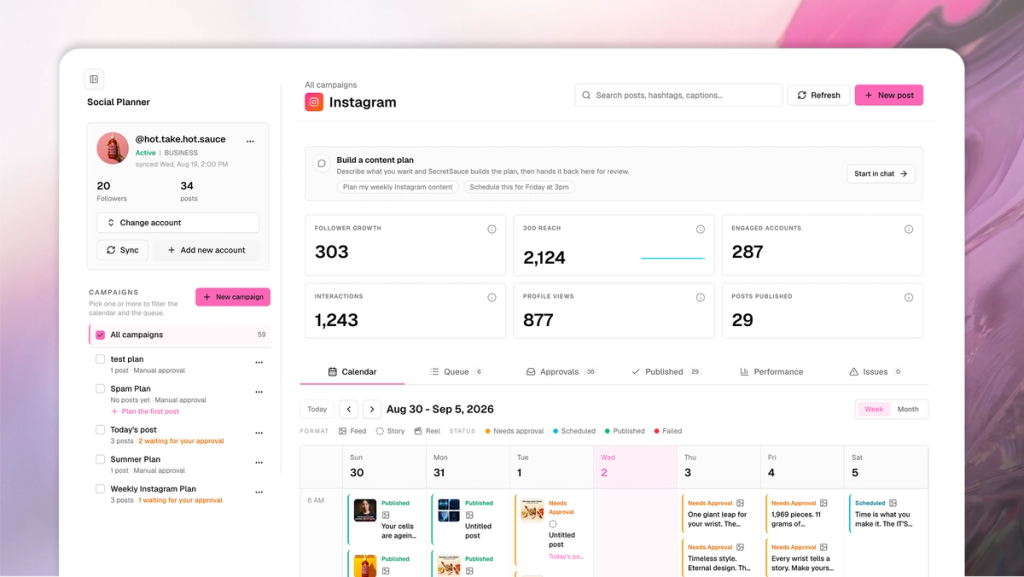
Pro tip: use the Social Planner in SecretSauce to automate this for you. It'll read your social media account data and generate a calendar of ideas with top hooks and formats. Once you're happy, it'll write the caption, make the image or video, and publish straight to your Instagram.
Now it’s your turn
Pick one task and run it end to end before you add another.
- Today: Build your Brand Brain, since captions, ad copy, and photo styling all read from it
- Tomorrow: Take your next scheduled post and ask for 3 caption versions instead of writing one
- This week: Run one image through Smart Resizer at every size that post needs
- Next week: Ask for your Instagram week on Monday morning and work from the table
- Any week you run dry: check Creative Radar for the formats getting engagement in your niche right now and build the week from those
Six years of making content taught me which parts of the week were mine. Start with one of these 7. Free to start at trysecretsauce.ai.
If video is the task you want to hand over first, read AI UGC for brands: Everything you need to know for how the whole workflow fits together.
People also ask
Can AI really match my brand's voice and tone?
Not out of the box. A model that has never seen your brand writes a generic version of your category, so the first caption reads like it could belong to any pasta brand or any payroll app. It matches your voice once you give it the raw material: paste your website copy and two posts that sound right, ask it to write down your tone, your words, and how you close a post, then feed that back in every time. SecretSauce does this step for you by reading your site and your existing posts and building a Brand Brain, so every caption gets written from it.
What's the difference between AI image expand and AI image rebuild for resizing?
Expand keeps your original image and generates new background around it to fill the bigger frame. Your elements stay put, so a logo already near the edge still sits near the edge, and anything outside the new frame stays outside it. Rebuild regenerates the composition for the new ratio and moves the elements, which suits ads and anything carrying text, with the risk that a model redrawing your image also redraws your logo. Expand is safer for a simple subject with room around it; rebuild is better when the layout has to change.
How many caption variations should I ask AI to write?
Three, each on a different angle: curiosity, benefit, and specificity. One caption gives you nothing to judge it against, since it's the only option you've seen. Three let you pick the strongest line and notice when all of them miss, which tells you the brief was the problem rather than the writing.