Build workflows
Automate your most repeated workflows so you never have to set them up again
Skill Builder lets you turn any repeated workflow into a shortcut.
Instead of going through the same steps every time you create a certain type of asset, you build it once as a Skill and run it whenever you need it - with your settings, preferences, and steps already locked in.
When to use it
Use Skill Builder when you find yourself doing the same thing repeatedly, especially if you’re trying to run everything yourself without building a full team.
If you're always generating assets at a specific size, always upscaling to the same resolution, or always following the same sequence of steps to produce a certain type of content - that's a workflow worth turning into a Skill.
It's especially useful for brands that produce high volumes of content regularly, or anyone who wants to batch create without having to configure the same settings every time.
Where to find Skills
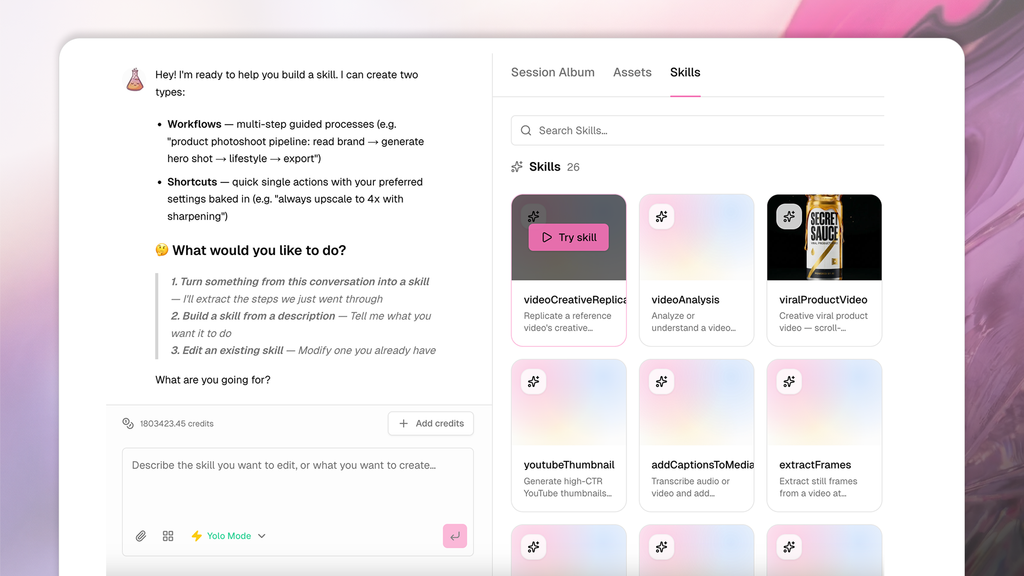
Skills live in the right pane of any chat session. Once you've built a Skill, you'll find it there every time you open a new session - ready to run without having to set anything up again.
Two types of Skills
Skills come in two forms depending on how much you want to automate.
1. Single-action shortcuts
A single-action shortcut locks in one setting or preference so you don't have to specify it every time. Useful for things like output size, resolution, or format.
- "Create a shortcut that always upscales to 4x"
- "Create a shortcut that always exports in square format for Instagram"
- "Build a shortcut that always generates 10 variations"
2. Multi-step workflows
A multi-step workflow automates a sequence of actions end to end.
You define the steps once and SecretSauce runs through them automatically every time you trigger the Skill.
- "Build a pipeline that ideates, generates, and captions a week of Instagram posts for @[product]"
- "Create a workflow that takes a product shot, upscales it, and exports it in three formats"
- "Build a pipeline that generates 5 ad variations from a single product shot and exports them ready for Meta"
- "Create a workflow that generates a product shot, cleans up the background, and saves it to my Content Library"
Running a Skill
Once a Skill is built, you can trigger it from the chat at any time. Tag your product or any other relevant asset and run the Skill - SecretSauce handles the rest.
- "Run my Instagram post pipeline for @[product]"
- "Use my ad variation workflow for this week's campaign"
- "Apply my upscale shortcut to these assets"
Editing a Skill
To edit a Skill, go the Skill Builder and tell SecretSauce which Skill you want to edit and what you want to change. SecretSauce will handle the rest.
Sharing a Skill
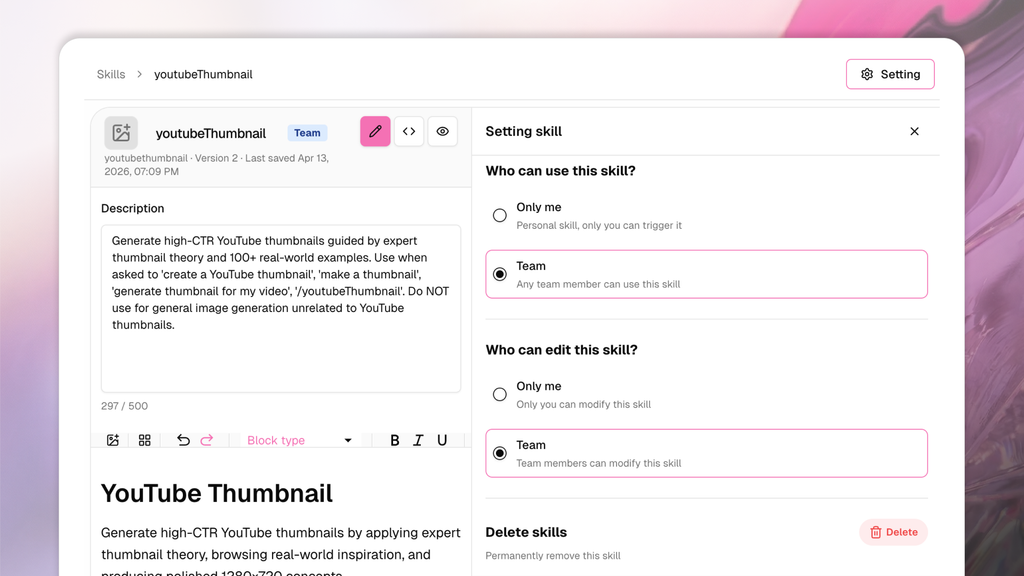
SecretSauce lets you share Skills you’ve created with your team. Here’s how:
- Hover over your Skill and click the Edit button
- Tap Settings in the top right
- Choose who can view your Skill
- Choose who can edit your Skill
- Press Save